From Plain Text to Generative UI
AI agents still write text. What changed is how we display it, and how we check it.
Content
Problem statement
In 2022, an AI model answered a question with a paragraph of text. In 2026, an AI agent can answer the same question with an interface that it designs for you: a table, a map, a 3D scene or a small app.
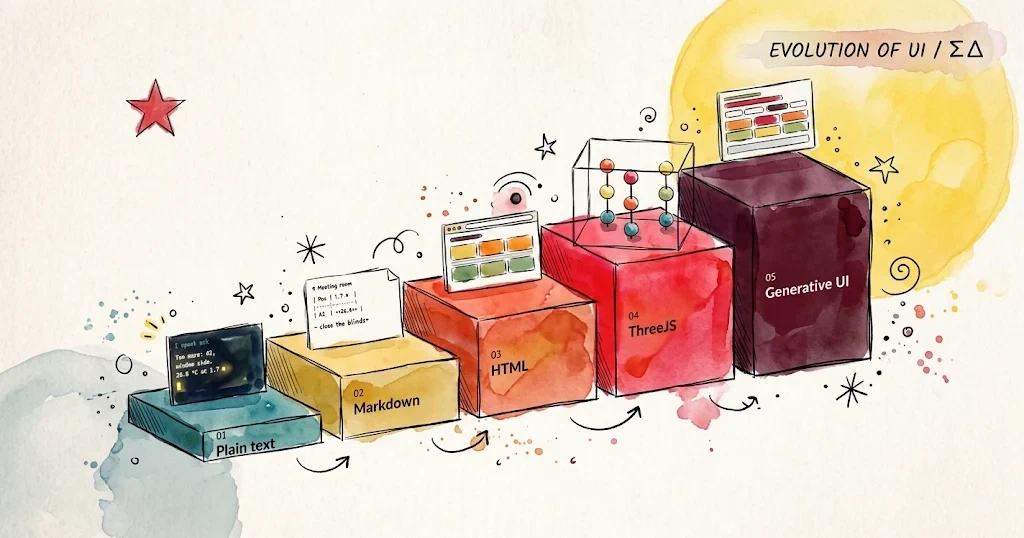
My thesis is simple. The output of AI agents moved up a ladder with five levels: plain text, Markdown, HTML, ThreeJS and generative UI. Each level changed what the reader does with the answer:
- You read plain text.
- You scan Markdown.
- You use HTML.
- You explore a ThreeJS scene.
- You act on a generative UI, an interface that the agent designs for your question.
One thing stayed the same: the model. A language model writes tokens, small pieces of text, one after another. Every level is still text. The change happened in the software between the model and the reader: the renderer, which turns text into something you can see.
The output never stopped being text. The renderer changed.
This matters because each level costs more than the level below it. It needs more tokens, takes more time, breaks in more ways and takes more effort to check. In this article, I describe each level, answer one question at all five levels, and finish with five strategies to generate output at the right level.
The five levels
The table below compares the five levels. The interpreter is the software that reads the agent’s text and shows it to a person.
| Level | Interpreter | What the reader does | How you check it |
|---|---|---|---|
| Plain text | A terminal, a log file, another program | Reads | Compare it with the expected text |
| Markdown | A chat app, GitHub, a code editor | Scans | Read the diff (the list of changed lines) |
| HTML | A web browser | Uses | Take a screenshot and inspect the page structure (the DOM) |
| ThreeJS | A web browser and the graphics card, through WebGL | Explores | Render the scene and look at it from several angles |
| Generative UI | A web browser, with a new interface for every question | Acts on the answer | Check the data, the layout and the behaviour of every answer |
1. Plain text: the output is an answer
At the first level, the output was a string of characters. In 2020, the GPT-3 API returned a completion: the text that continued your prompt. The first AI agents used regular expressions to read that text and decide which tool to call next.
Plain text is still the best format for one type of reader: a machine. Log files, exit codes, commit messages and JSON lines all use plain text. It costs little, version control tracks it well, and one simple test can check it. For people, however, plain text becomes hard to read after one or two paragraphs. It has no headings, no emphasis and no structure to scan.
2. Markdown: the output is a document
John Gruber created Markdown in 2004. Years later, chat apps made it the standard format for AI answers: headings, bullet lists, tables and code blocks. Markdown won for three reasons:
- It is cheap. It adds only a few extra tokens to the text.
- It fails gracefully. If no software renders it, raw Markdown still reads as normal text.
- Models know it well. Their training data contains a huge amount of Markdown, from README files and documentation.
Later, Markdown also became the format that agents read. Today, teams give instructions to their agents in Markdown files: CLAUDE.md, AGENTS.md (an open format that several vendors support), and llms.txt, a proposal that helps agents read websites. I described my own CODING.md file in Tips to Structure Codebases for AI Agents. Markdown is the only level that both people and agents read easily, so it will not disappear.
3. HTML: the output is an application
The move to HTML happened in public, in about a year and a half:
- June 2024: Anthropic released Claude 3.5 Sonnet with Artifacts. Artifacts show the documents and web pages that Claude creates, next to the chat.
- October 2024: OpenAI launched Canvas, a workspace next to the chat for writing and code.
- December 2024: LMArena opened WebDev Arena. Two models build a web app from the same prompt, and people vote for the better one.
- October 2025: OpenAI launched apps in ChatGPT. These apps show interactive elements, such as maps, sliders and video players, inside the conversation.
With HTML, the reader stops reading and starts using the answer: filtering, sorting and clicking. The answer no longer describes a tool. The answer is the tool.
4. ThreeJS: the output is a space
Three.js is a JavaScript library that draws 3D graphics in a web browser. It uses WebGL, and more recently WebGPU, to talk to the graphics card. For a model that can only write text, Three.js is the shortest path to 3D. It needs no game engine, no installation and no 3D model files. A few hundred lines of JavaScript create shapes, lights and a camera, and the result runs on any modern phone.
At this level, the position of things becomes the information. Some examples: a digital twin (a virtual copy) of a warehouse, a molecule, a building, a product configurator, a physics lesson or a game prototype. The reader explores the scene: they rotate it, zoom in and look behind objects.
The cost rises again. A scene can run without a single error and still show the wrong thing. The camera can point at empty space, a wall can hide a label, or the colour scale can go in the wrong direction. The code does not tell you about these problems. You only find them when you look at the result.
5. Generative UI: the output is an interface for your question
At the first four levels, a person chooses the format in advance: a team decides to show a table, a web page or a 3D scene. Generative UI reverses this order. The agent reads the question, decides what the reader needs, and then designs the interface: the layout, the controls and the amount of detail.
In November 2025, Google presented generative UI with Gemini 3. The model builds a custom interface for any prompt, from a single word to detailed instructions. In Google’s tests, human raters preferred these interfaces to every other format, except websites that human experts designed. Google also lists the limits: an answer can take a minute or more, and it sometimes contains errors.
Google was not the first to try this idea. In March 2024, Vercel added generative UI to its AI SDK, a popular toolkit for developers who build AI apps. With it, the model does not only return text: it can also choose a component and send it to the page. In Vercel’s example, a user asks about the weather in a city. The model calls a weather tool, the page shows a loading spinner, and then a weather card with live conditions replaces the spinner. With a toolkit like this, any developer can add generative UI to their own app.
Generative UI is not a new file format. It sits on top of the other four levels. Depending on the question, a generative interface can start with one sentence, show a table, add a control or open a 3D view. Each question gets a different interface.
This creates the hardest checking problem of all. Every reader sees a different interface, so you cannot test one design once and move on. You need to check the data, the layout and the behaviour of every answer.
One question, five levels
People in a meeting room say it feels too warm, but the thermostat by the door shows 21.5 °C. The facilities team asks an agent: where is the meeting room too warm?
The room is an example, not a real place. It has a large window on one side and six sensor stands: A1 to A3 by the window and B1 to B3 by the door. Each stand measures the air at three heights: 0.1 m (the feet), 1.1 m (the head of a seated person) and 1.7 m (the head of a standing person). The 2005 edition of ISO 7730 suggests 20 to 24 °C for offices in winter.
Plain text. The key fact, ready for a chat message or another agent:
Too warm: A2, window side.
26.4 °C at 1.7 m. Limit: 24 °C.
Markdown. The window side as a table, easy to scan and to review in a pull request:
| Position | 0.1 m (feet) | 1.1 m (seated head) | 1.7 m (standing head) |
|---|---|---|---|
| A1 | 20.4 °C | 22.6 °C | 23.5 °C |
| A2 | 20.4 °C | 24.9 °C | 26.4 °C |
| A3 | 20.6 °C | 23.8 °C | 24.6 °C |
HTML. A floor plan. Each colour shows the average of the three heights:
The average hides the problem: A2 averages 23.9 °C, under the limit. Here, two lines of plain text say more than the colourful map.
ThreeJS. All three heights at once:
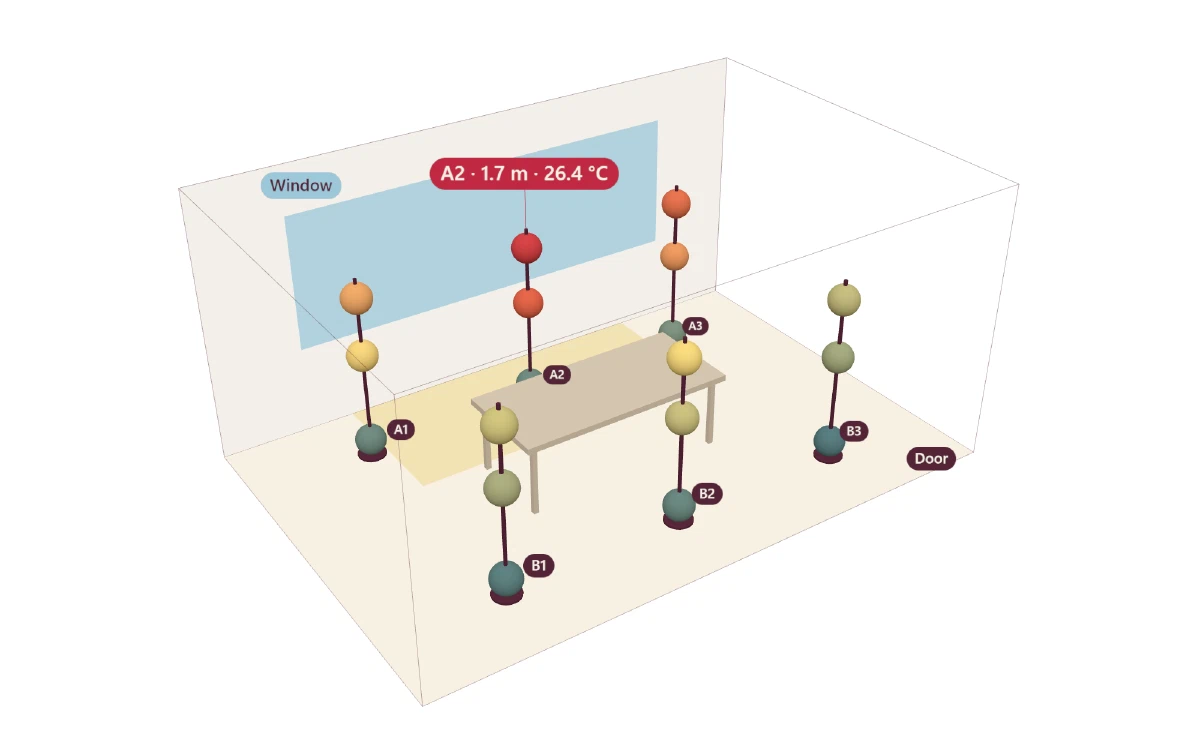
Now you can see the problem: warm air at head height around A2, but only 20.4 °C at the feet. ISO 7730 suggests less than 3 °C between head and feet, and here the difference is 4.5 °C. But the reader still has to find it.
Generative UI. The agent designs an interface for this exact question. It starts with the answer, offers one control (the height) and ends with an action:
On the window side, at head height. A2 measures 26.4 °C at 1.7 m. What to do: close the blinds in the afternoon. (The interactive version of this interface needs JavaScript.)
It shows the answer first and contains the levels below it: a sentence, a floor plan and a control. It also skips 3D, because a floor plan is enough here. And the answer changes the solution: close the blinds in the afternoon, and keep the heating as it is.
All five answers use the same file: room.json.
Five strategies to generate output
1. Choose the lowest level that serves the reader
The W3C’s Rule of Least Power (2006) gives simple advice: choose the least powerful language that does the job. Each level up costs more tokens and more time, and adds new ways to fail. Name the reader in your prompt, and match the level to that reader:
- A program or another agent: plain text or JSON.
- A person who reviews changes in Git: Markdown.
- A person who needs to filter, compare or act: HTML.
- A person who needs to understand positions in space: ThreeJS.
- A person with a new question every time: generative UI.
2. Separate the data from the presentation
Ask for the data first and the presentation second. With structured output, the model returns JSON that follows a schema you define, and simple, repeatable tests can check it. I explain why in How to Build your Own LLM Benchmark. In the example above, every answer comes from one JSON file, so the answers cannot disagree.
3. Lock the versions and the style
Models know the old versions of an API best. Three.js publishes a new release about once a month, and release r125 removed THREE.Geometry, which many old tutorials still use. Lock exact versions (three@0.170.0), give the agent a starting template, and define the colours and design rules. For generative UI, a design system matters even more, because the agent builds a new interface every time.
4. Include the lower level in every higher level
Start with a simple version that works everywhere, then add richer features. Web developers call this progressive enhancement. A 3D scene needs a static image, and a dashboard needs a text summary. RSS readers, screen readers, slow phones and other agents all depend on it, and this blog publishes an llms.txt file for the same reason. In your prompt, ask for the answer first and the visual second.
5. Let the agent see its output
You check text with a test, but you check a 3D scene or a generative UI by looking at it. A tool such as Playwright MCP lets the agent open the page in a headless browser (a browser without a window), collect errors and take screenshots. Check that the console shows no errors, the subject is in the frame, the labels are readable, and the page works on a phone, in dark mode and without WebGL. The screenshots of the examples above showed three problems that the code did not show.
Conclusion
No level replaced the level below it. Markdown did not replace plain text, HTML did not replace Markdown, and ThreeJS will not replace HTML. Generative UI uses all of them. Today, agents can produce anything that a browser can draw, and they can design a new interface for every question. So the hard question changes from can the agent produce this? to should it?
After generative UI, the ladder may leave code behind. World models such as DeepMind’s Genie 3 create environments that you can explore, frame by frame, from a prompt, with no code in between. For now, the most useful agents speak all five levels and choose the lowest one that does the job.
Agents can draw anything a browser can draw. Deciding what they should draw is still our job.
Explore
- Generative UI: Google’s research on level five, with many examples.
- The Rule of Least Power: the W3C rule for choosing the right level.
- WebDev Arena: compare the web apps that two models build from one prompt.
- Three.js: real 3D projects that run in your browser.
- Genie 3: worlds that a model creates frame by frame.
- AGENTS.md: instructions for coding agents, in Markdown.
- llms.txt: helps agents read websites.
- Playwright MCP: so an agent can see its own output in a browser.
- room.json: the data behind the meeting room example.