Emails, spreadsheets, SQL: can AI agents connect the dots?
The answer hides across emails, Excel workbooks, screenshots and databases. The flagship model is not always the best one.
Content
Can an AI agent open an Outlook email, follow it into an Excel workbook, query a database it has never seen and come back with the right number?
In my last post, How to Build your Own LLM Benchmark, I shared tips for building your own. I kept two things back: the model names and the benchmark itself. Today you get both.
Meet finrec-bm, my benchmark for financial reconciliation, now on GitHub. It hands AI agents a number to verify and a pile of evidence: emails, spreadsheets, screenshots and a database. The answer has to be right to the cent, with the paper trail to prove it.
The job in 60 seconds
Every company keeps a record of the money it receives and spends: the ledger. Everyone it deals with keeps their own version: the bank, suppliers, customers, the colleague with the spreadsheet. The job is to line those versions up, match every item and explain every difference.
Sounds like adding numbers. It isn’t. One payment settles three invoices. The bank keeps a fee. A euro invoice gets paid in dollars. A June sale lands in July. Somebody types 8,420 instead of 8,240.
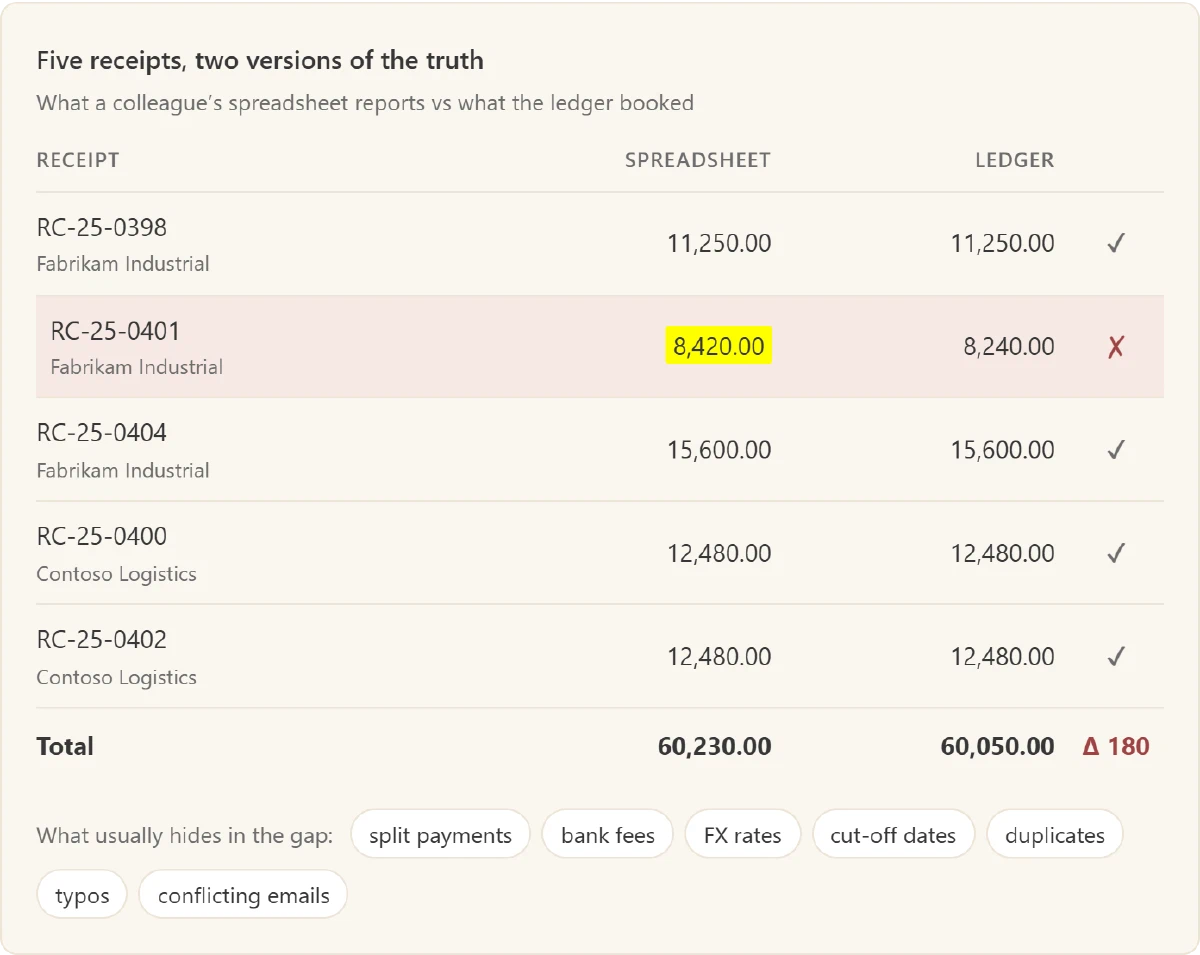
Adding up numbers is the easy part. Deciding which numbers count is the job.
Accountants do this every month, under deadline, across emails, CSV exports, Excel files and screenshots. That makes it a great test for AI agents: lots of reading, a little arithmetic and zero tolerance for “close enough”.
What finrec-bm tests
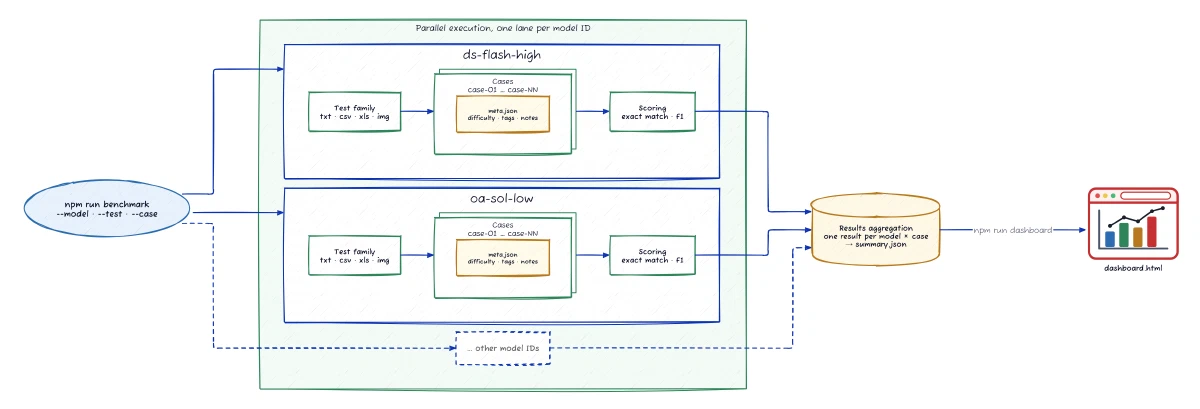
Each case reads like a message from a colleague: “Internal audit wants us to confirm this net cash flow. The email and the spreadsheets are in the folder.” Nobody tells the model where to look. It gets tools, functions it can call, and decides for itself:
- Emails:
read_msg_fileunpacks Outlook.msgfiles, a binary format, into sender, recipients, dates, subject, body and attachments. Ten of the 22 cases include at least one. - Spreadsheets: file readers open Excel
.xlsworkbooks, CSVs and plain text, including cell formulas, fill colours and embedded pictures. - Databases:
query_ledgerruns SQL against a ledger database the model has never seen. It explores the tables and writes its own queries, up to ten per call: 4,723 across all runs. - Screenshots:
read_image_filelets the model view images. - Arithmetic:
calculatedoes exact decimal maths, because floating point and money don’t mix.
The model gets 30 turns to return a structured answer: a verdict, the value the evidence supports, and every record, cell and row behind it. Four test families raise the bar one file format at a time:
Plain text ·
txt-matching· 3 cases · 89% of runs passed (67 of 75)Find the transactions behind a reported total, converting currencies at the right monthly rate.
Example: “Coho Vineyard reported September spending of 4513368.4. Adventure Works reported 4.9M.” Each log line shows two unlabelled amounts. Only the first amounts of two Coho lines add up, and 4.9M is a single line rounded to millions.
Database + CSV ·
csv-matching· 10 cases · 68% of runs passed (169 of 250)Combine four or more sources: database tables, CSVs, meeting minutes and
.msgemails. Typical traps: period cut-offs, accruals, VAT and cost allocations.Example: “The Q3 board pack reported marketing spend of USD 1,580 thousand.” The minutes set the rules: marketing campaigns only (the database says which), monthly average FX rates, and round only the total. Round each line first and you get 1,579.
Excel ·
xls-matching· 6 cases · 59% of runs passed (88 of 150)Check highlighted cells against
.msgemails and the ledger. Watch the formulas: the figure itself might be wrong.Example: The request is one of five
.msgemails: confirm EUR 41,618.00 for two highlighted rows. Each row’s comment names whose email holds its final amount, and both people wrote theirs in hexadecimal. A third, unhighlighted row has a name too. Leave it out.Screenshots ·
img-matching· 3 cases · 59% of runs passed (44 of 75)Same as Excel, except the numbers live inside images: in
.msgemail bodies, attachments and workbooks.Example: Accounts payable emails a screenshot of the payment run (a batch of supplier payments) and asks whether its highlighted total agrees with the ledger. The image shows 63,950.40 and the rows add up, but one payment appears twice. The ledger supports 59,137.80.
No LLM judges the answers. A rule-based scorer compares the cited evidence with the expected list, so every score is reproducible. A case passes only on an exact match: every expected item, nothing extra, the right verdict and the right value to the cent. Tough? Sure. So is your auditor.
Your turn: spot the trap
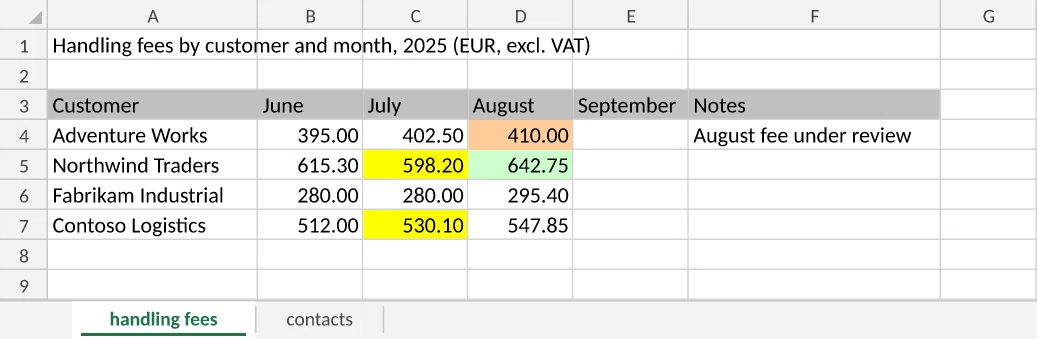
Here’s one of the hardest cases, from the Excel family. Tailspin Toys, a group of three companies, re-bills (“recharges”) its customer Northwind Traders for the freight it paid on their orders. Three .msg emails land in your inbox, in this order:
Priya Natarajan · Logistics manager · Mon 29 Sep
“For the August recharge to Northwind Traders: it covers every freight charge on a Northwind Traders order dated in August 2025, whichever Tailspin Toys entity booked it (BV, GmbH or Inc), plus our handling fee for August. The fee is highlighted in green in freight-recharge-2025-08.xls.”
Tom Whitaker · Account manager · Tue 30 Sep
“Small correction to Priya’s note. The Northwind recharge only covers the freight booked by Tailspin Toys BV […] And the handling fee to add is the one highlighted in yellow in the workbook, not the green one.”
Ingrid Halvorsen · Group controller · Wed 1 Oct
“[…] Priya’s email is the correct one. […] The yellow figures in the workbook are the July fees, which have already been invoiced. Before we invoice it, please confirm the August 2025 recharge to Northwind Traders: EUR 10,760.80, per the draft.”
Here’s the workbook the emails refer to:
The freight charges live in the ledger. The customer sits in sales_orders and the booking entity in entities, so the model’s query needs two joins:
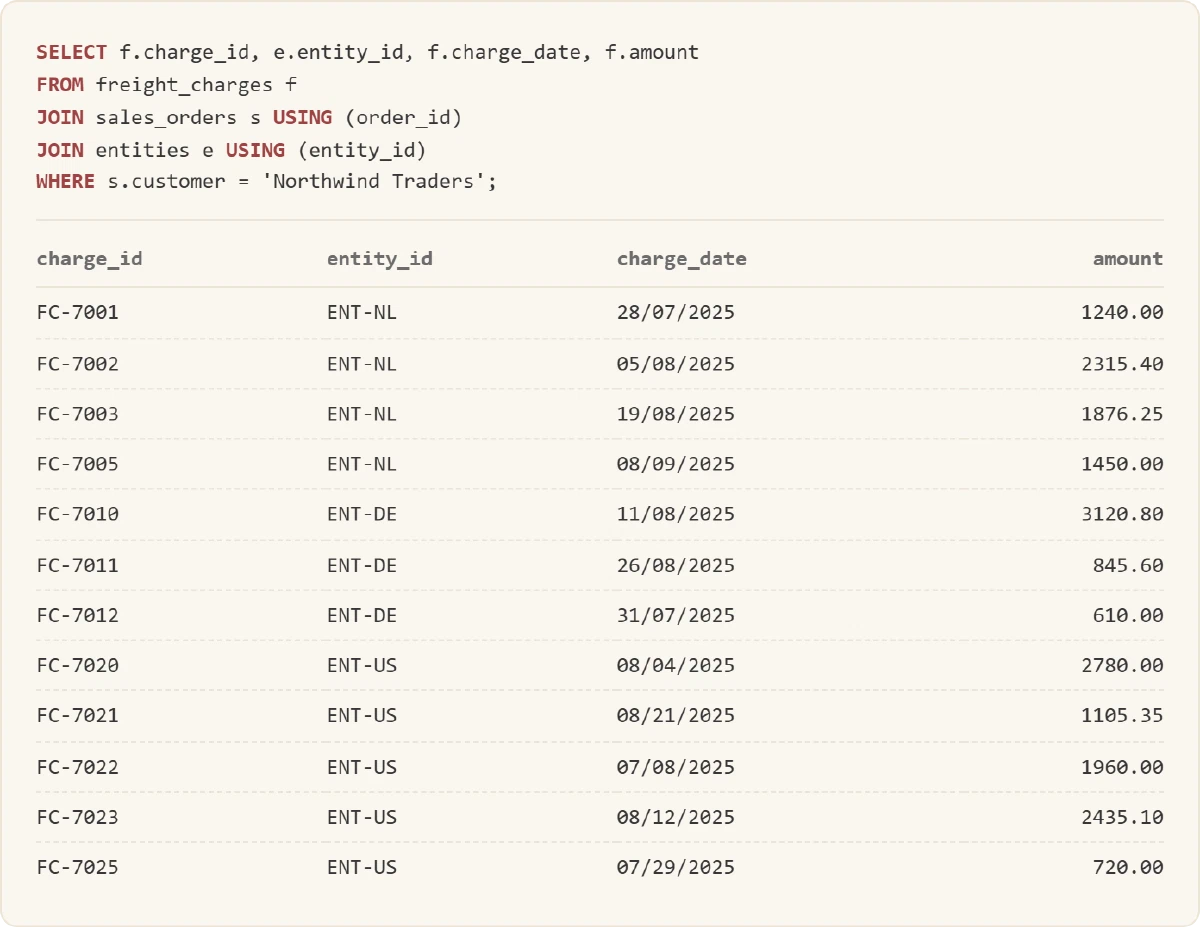
Does EUR 10,760.80 hold up? Which cells and charges make up the right number? Take a minute before you peek.
Show the answer
Not confirmed. The evidence supports EUR 15,121.25.
- Follow Priya. Tom wrote after her, but the group controller, who outranks both, wrote last and backs Priya.
- Keep D5, the only green cell: 642.75. Drop C5 and C7 (yellow: July fees, already invoiced) and D4 (tan: another customer’s fee, under review).
- Keep every entity’s freight, not just the BV’s.
- Read each date in its entity’s format. ENT-NL (the Dutch BV) and ENT-DE (the German GmbH) write the day first; ENT-US writes the month first. So 08/04/2025 means 4 August and 07/08/2025 means 8 July.
- Keep the seven August charges: FC-7002, 7003, 7010, 7011, 7020, 7021 and 7023, for 14,478.50. Add 642.75 and you get 15,121.25.
And the draft’s 10,760.80? It reads every date day first, so the US entity’s 8 July charge sneaks into August and three real August charges drop out.
Only 5 of 25 configurations passed, all of them DeepSeek. Most others found 15,121.25 but cited an email as a source record, which counts as wrong evidence (more on that below). Three GPT-6 Luna settings confirmed the draft’s 10,760.80 outright.
Boss level: every format in one case
The quiz kept each clue in its own file. The boss level nests them, so each format holds one piece of the puzzle: an Outlook .msg email, an Excel workbook, a screenshot and ledger postings the model finds with its own SQL.
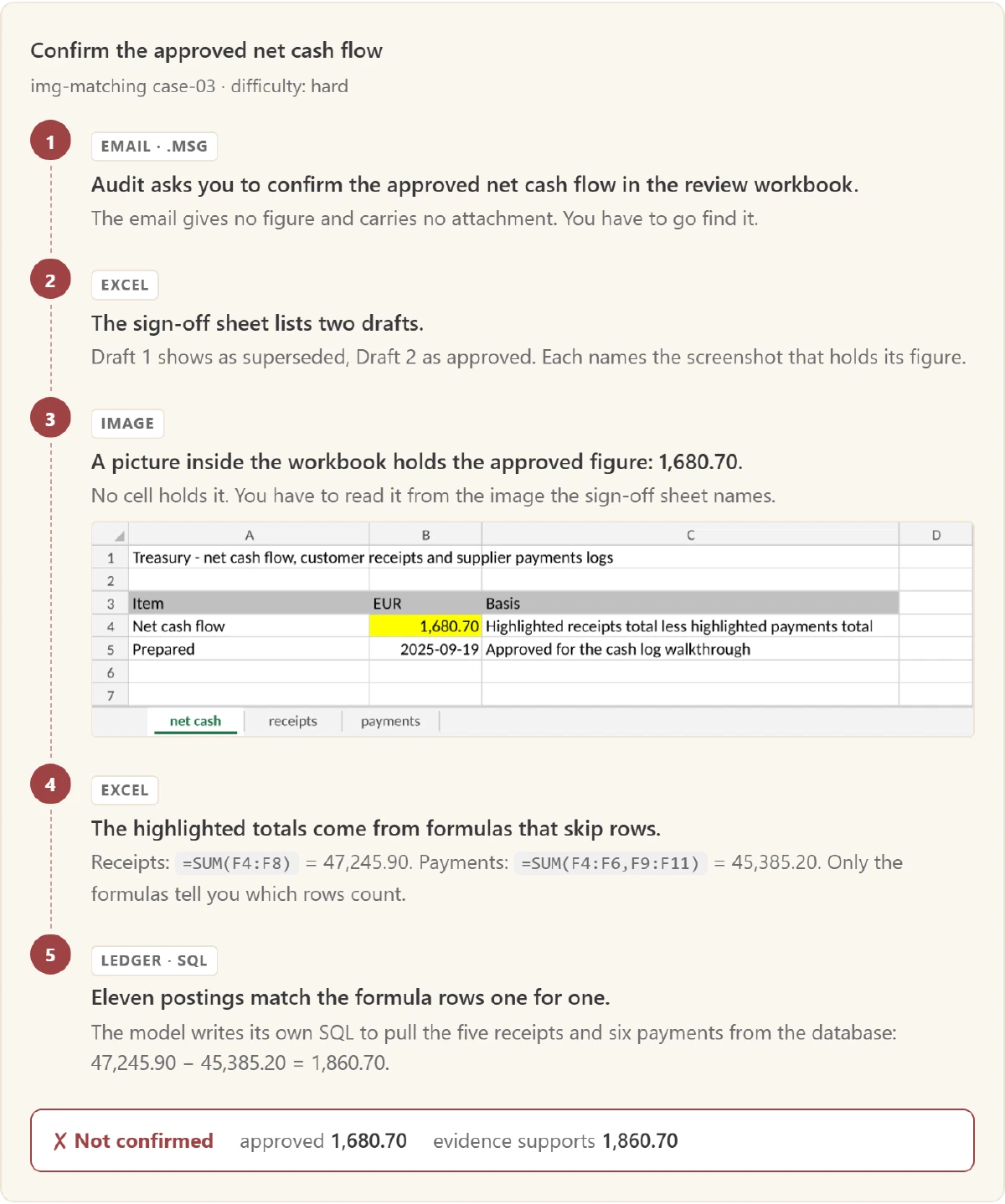
Eighteen of the 25 configurations found 1,860.70, but only six passed. The other twelve cited the sign-off sheet as evidence: it points to the right picture but proves nothing about the total.
DeepSeek V4 Pro never got that far. It failed every screenshot case at every setting, 0 of 12, while its smaller sibling DeepSeek Flash passed 8 of 12. In one run, V4 Pro even tried to read a PNG’s raw bytes through SQL. Points for creativity.
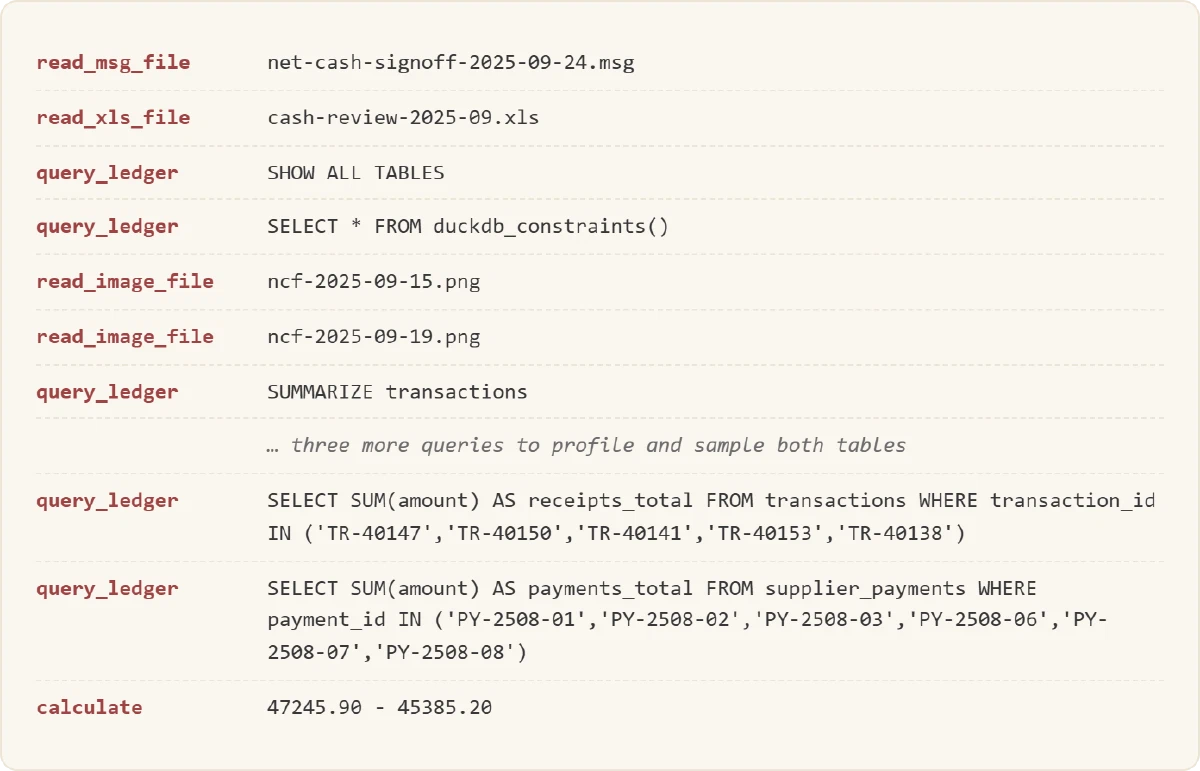
Here’s how GPT-6.1 Sol at low reasoning cracked it, tool call by tool call. Nobody gave it the schema: it discovered the tables and wrote every query itself.
The results
First, let’s unmask the letters from my last post:
| Letter | Model | Provider |
|---|---|---|
| A | GPT-6.1 Sol | OpenAI |
| B | Claude Sonnet 5.5 | Anthropic |
| C | DeepSeek Flash | DeepSeek |
| D | GPT-6 Luna | OpenAI |
| F | DeepSeek V4 Pro | DeepSeek |
A model’s reasoning level sets how much it thinks before answering: more thinking means more tokens and a bigger bill. Add Claude Haiku 5.5, run each model at every level its API offers, and you get 25 configurations. Here’s how many of the 22 cases each one passed:
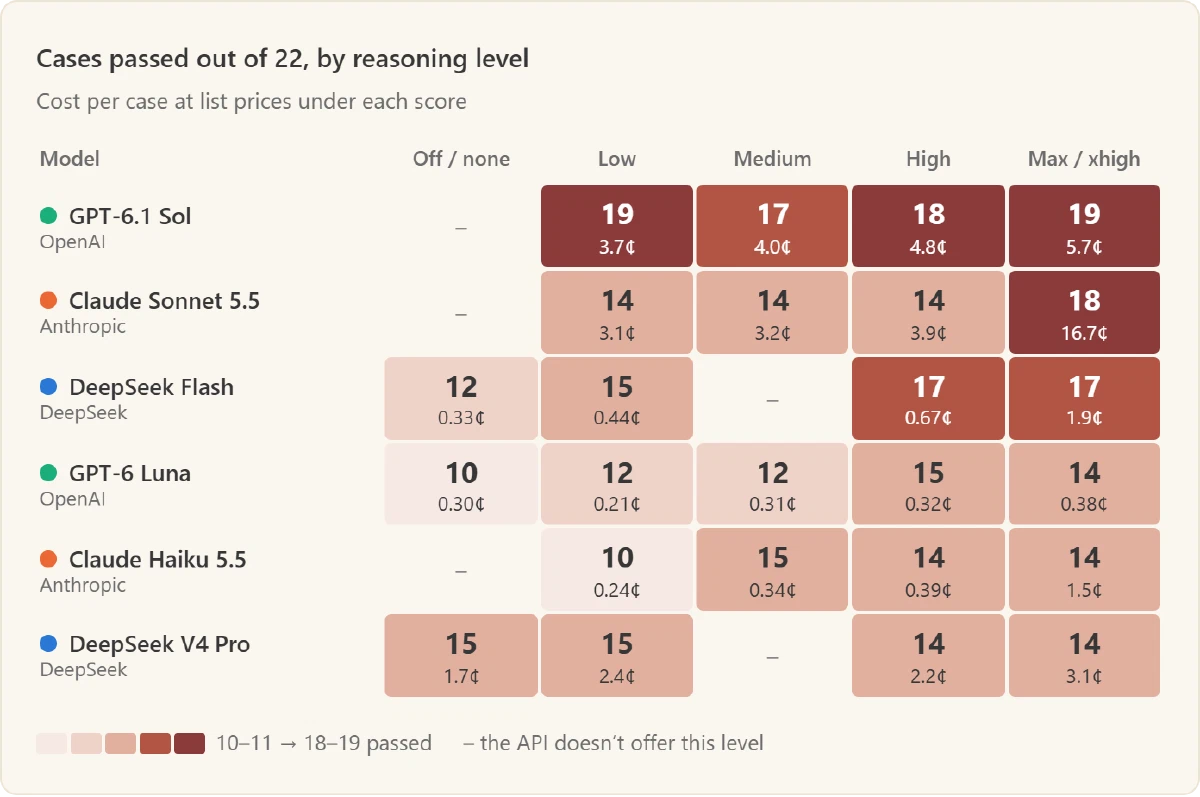
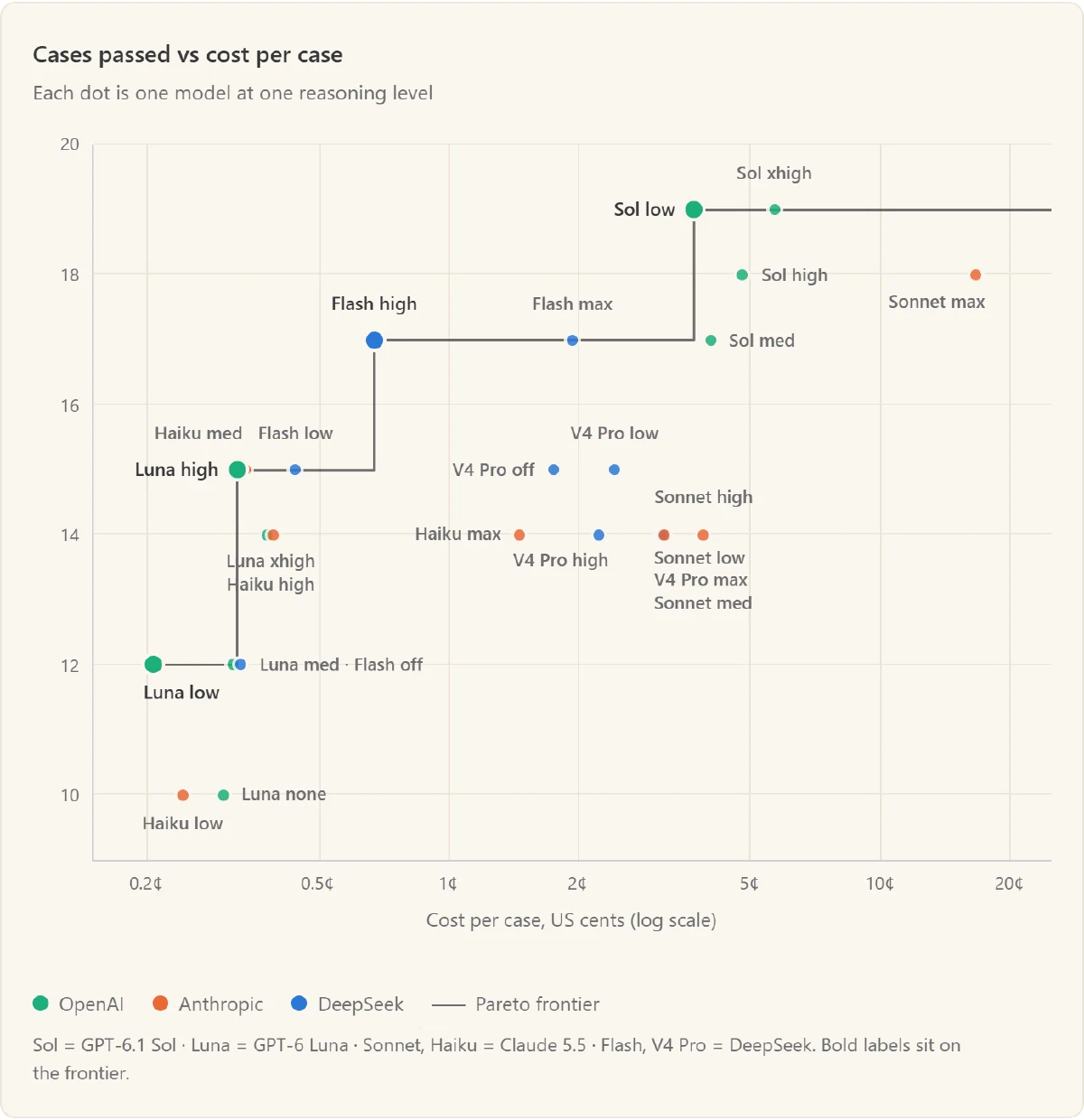
GPT-6.1 Sol at low reasoning takes the top spot: 19 of 22 for 3.7 cents a case. Raising it to xhigh buys the same 19 for 54% more. To weigh score and price together, plot them against each other. The line is the Pareto frontier: the configurations no other configuration beats on both. Everything off the line pays more for the same score, or scores less for the same price.
All 25 configurations as a table
Ranked by cases passed, then by cost. Bold rows sit on the Pareto frontier.
| Model | Reasoning | Cases passed (of 22) | Cost per case |
|---|---|---|---|
| GPT-6.1 Sol | low | 19 | 3.7¢ |
| GPT-6.1 Sol | xhigh | 19 | 5.7¢ |
| GPT-6.1 Sol | high | 18 | 4.8¢ |
| Claude Sonnet 5.5 | max | 18 | 16.7¢ |
| DeepSeek Flash | high | 17 | 0.67¢ |
| DeepSeek Flash | max | 17 | 1.9¢ |
| GPT-6.1 Sol | medium | 17 | 4.0¢ |
| GPT-6 Luna | high | 15 | 0.32¢ |
| Claude Haiku 5.5 | medium | 15 | 0.34¢ |
| DeepSeek Flash | low | 15 | 0.44¢ |
| DeepSeek V4 Pro | off | 15 | 1.7¢ |
| DeepSeek V4 Pro | low | 15 | 2.4¢ |
| GPT-6 Luna | xhigh | 14 | 0.38¢ |
| Claude Haiku 5.5 | high | 14 | 0.39¢ |
| Claude Haiku 5.5 | max | 14 | 1.5¢ |
| DeepSeek V4 Pro | high | 14 | 2.2¢ |
| Claude Sonnet 5.5 | low | 14 | 3.1¢ |
| DeepSeek V4 Pro | max | 14 | 3.1¢ |
| Claude Sonnet 5.5 | medium | 14 | 3.2¢ |
| Claude Sonnet 5.5 | high | 14 | 3.9¢ |
| GPT-6 Luna | low | 12 | 0.21¢ |
| GPT-6 Luna | medium | 12 | 0.31¢ |
| DeepSeek Flash | off | 12 | 0.33¢ |
| Claude Haiku 5.5 | low | 10 | 0.24¢ |
| GPT-6 Luna | none | 10 | 0.30¢ |
Five things that surprised me
1. More thinking rarely pays
The top reasoning level beat every cheaper setting for exactly one model: Claude Sonnet, which jumped from 14 to 18 passes at 4.3× the cost. For the other five, it tied or lost. DeepSeek V4 Pro did its best work with thinking off or low. DeepSeek Flash at max matched Flash at high for 3× the money and 3× the wait. Claude Haiku at max ran out of tokens before answering on four cases: it overthought itself out of an answer.
2. The bargain bin holds a gem
DeepSeek Flash at high reasoning passed 17 of 22 for 0.67 cents a case: 15 cents for the whole benchmark. GPT-6 Luna at high passed 15 for a third of a cent. If you match thousands of transactions a month, that changes the maths.
3. Models “fix” the spreadsheet you asked them to check
Remember the 180.00 from the intro? It comes from another hard Excel case. Audit asks you to confirm a net cash flow: the highlighted receipts total minus the highlighted payments total. Two errors hide inside. One receipt has transposed digits, and the payments formula includes the July subtotal, so it counts July twice.
Most models caught both. Then 16 of 25 configurations made the same third mistake and landed on the same wrong number, 47,080.35. The receipts formula, =SUM(F4:F8), stops two rows short of the column. The models decided the formula was wrong and added those rows back in.
❌ Failed · Claude Sonnet 5.5, max reasoning
“Highlighted receipts total 60,230.00 is =SUM(F4:F8): it omits rows 9-10 (16,395.75) and carries 8,420 for row 5 where the ledger has 8,240.”
✅ Passed · GPT-6.1 Sol, low reasoning
“Highlighted receipts total is EUR 60,230.00, summing F4:F8. The matching ledger entries support EUR 60,050.00: row 5 overstates its receipt by EUR 180.00.”
Audit asked whether the total holds up, not what it should include. An auditor who quietly changes the population (the set of items under test) doesn’t solve a problem; they create a new one. Only five configurations resisted the urge.
4. Right number, wrong paper trail
On the Excel and screenshot cases, 42 of 86 failed answers had the right verdict and the right value to the cent. They failed on evidence. On the freight recharge from the quiz, 19 configurations cited an instruction email as a source record. On the boss level, twelve cited the sign-off sheet. Both documents tell you where to look; neither proves an amount. Harsh? In finance, the number is half the deliverable. The evidence is the other half, and every extra item in it is one more thing a reviewer has to check.
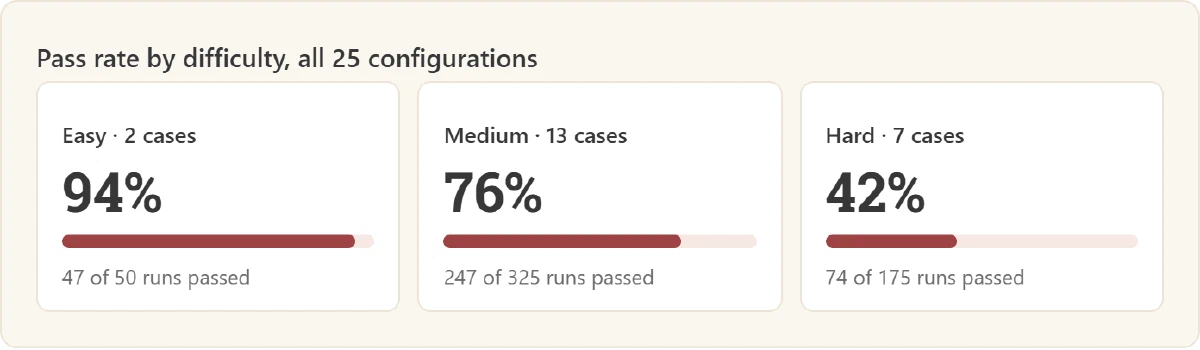
5. Hard cases stay hard
I rate each case’s difficulty when I write it, from its sources, formats and reasoning steps. Never from model scores, which would make the check circular. The ratings held up:
The fine print
- 22 cases is small. Each case is worth 4.5 points of pass rate, and with 95% confidence intervals, 23 of the 25 configurations statistically tie for first. Read the ranking as a shortlist, not a verdict.
- One run per configuration and case, so luck isn’t averaged out. Costs use list prices as of 12 October 2026.
- My cases, my job. Your mileage will vary, which was the whole point of the last post.
So, who would I hire?
It depends on the job. Here’s who won each part of it:
- Images: GPT-6.1 Sol. It passed 11 of 12 screenshot runs across its four settings, the best of any model. On a budget, GPT-6 Luna at low reasoning passed all three screenshot cases for 0.21¢ a case.
- SQL: GPT-6.1 Sol. Nineteen of the 22 cases need the ledger. Sol passed 82% of those runs; no other model passed more than 66%. At low reasoning, it passed 17 of the 19 with 145 queries, and not one query failed.
- High reasoning: DeepSeek Flash. Thinking lifts it from 12 passes (off) to 17 (high), one case behind GPT-6.1 Sol at high for a seventh of the price. Going past high buys nothing.
- Cost: DeepSeek Flash, high. 17 of 22 for 0.67¢ a case. GPT-6 Luna at high passes 15 for even less.
My picks: for high-volume matching, DeepSeek Flash at high reasoning, with a human checking its misses. For anything an auditor will read, especially with screenshots or ledger queries, GPT-6.1 Sol at low reasoning. For both: skip the max setting and insist on the evidence trail.
A correct number without evidence isn’t verified. It’s a lucky guess.
Try it yourself: the cases, the harness and the results are at github.com/rubenafo/finrec-bm.