Mind maps made easy with Claude Code and Obsidian
How quickly can you create a mind map?
Content
Karpathy
Andrej Karpathy recently surprised his audience by posting an article on personal productivity related to knowledge base curation using LLMs, a very personal approach on how to build a second brain. But sometimes you just need something to organize your ideas on a certain topic in a visual way: a mind map!
One side effects of Karpathy’s post was the increased public awareness about Obsidian capabilities, which was already very popular but gained renewed attention with a twist.
Karpathy highlighted its capabilities as a frontend tool. Obsidian can render Markdown content, which then can be leveraged to have a simple UI on top of your personal data with minimal effort.
One often overlooked Obsidian feature is Canvas, which I find surprisingly flexible for quick mind map ideation, especially since Obsidian natively supports JSON Canvas specification.
Obsidian supports the JSON Canvas specification natively
All of this, combined with a Claude Code skill (you could use any other agent anyway) allows you to generate a quick mind map representation of any topic.
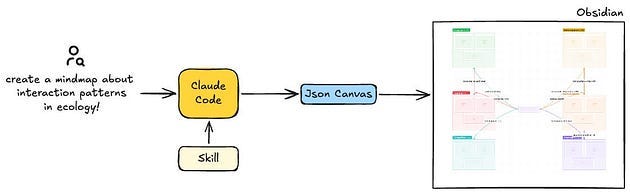
Canvas
Obsidian’s Canvas supports scrolling and zooming, allowing you to navigate different level of details directly. Features such as colors, information structure and relationship semantics can be refined by modifying the Skill config file.
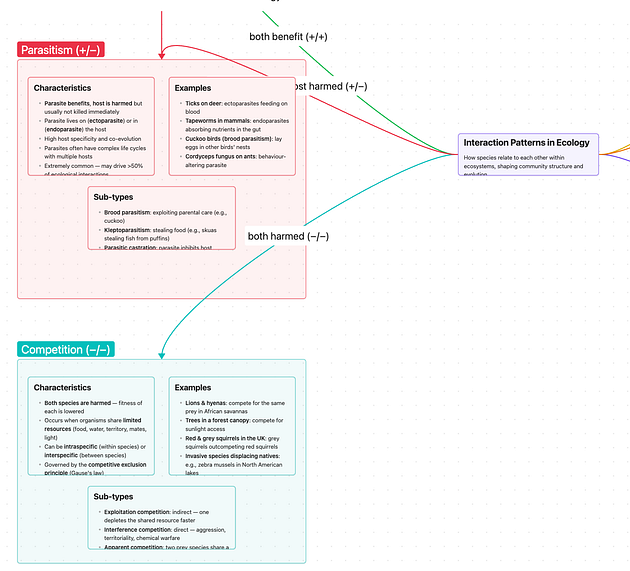
Once the mind map has been generated, it’s available for further customization: you can adjust colors, refine sections and move content around without needing to regenerate it. This provides an easy starting point for continuously evolving the mind map.
Resources
The skill config that I used in the example above can be found on Github.